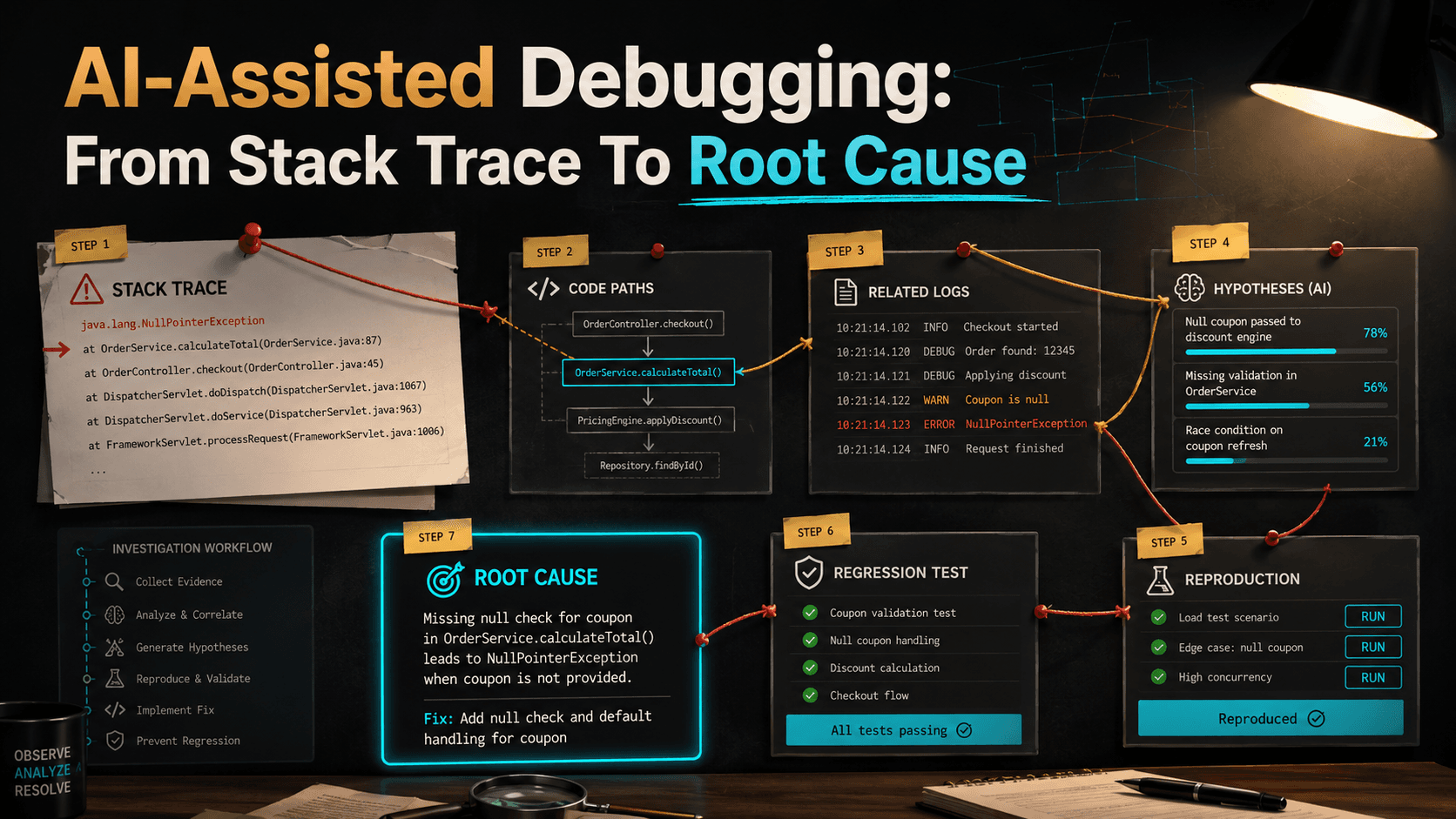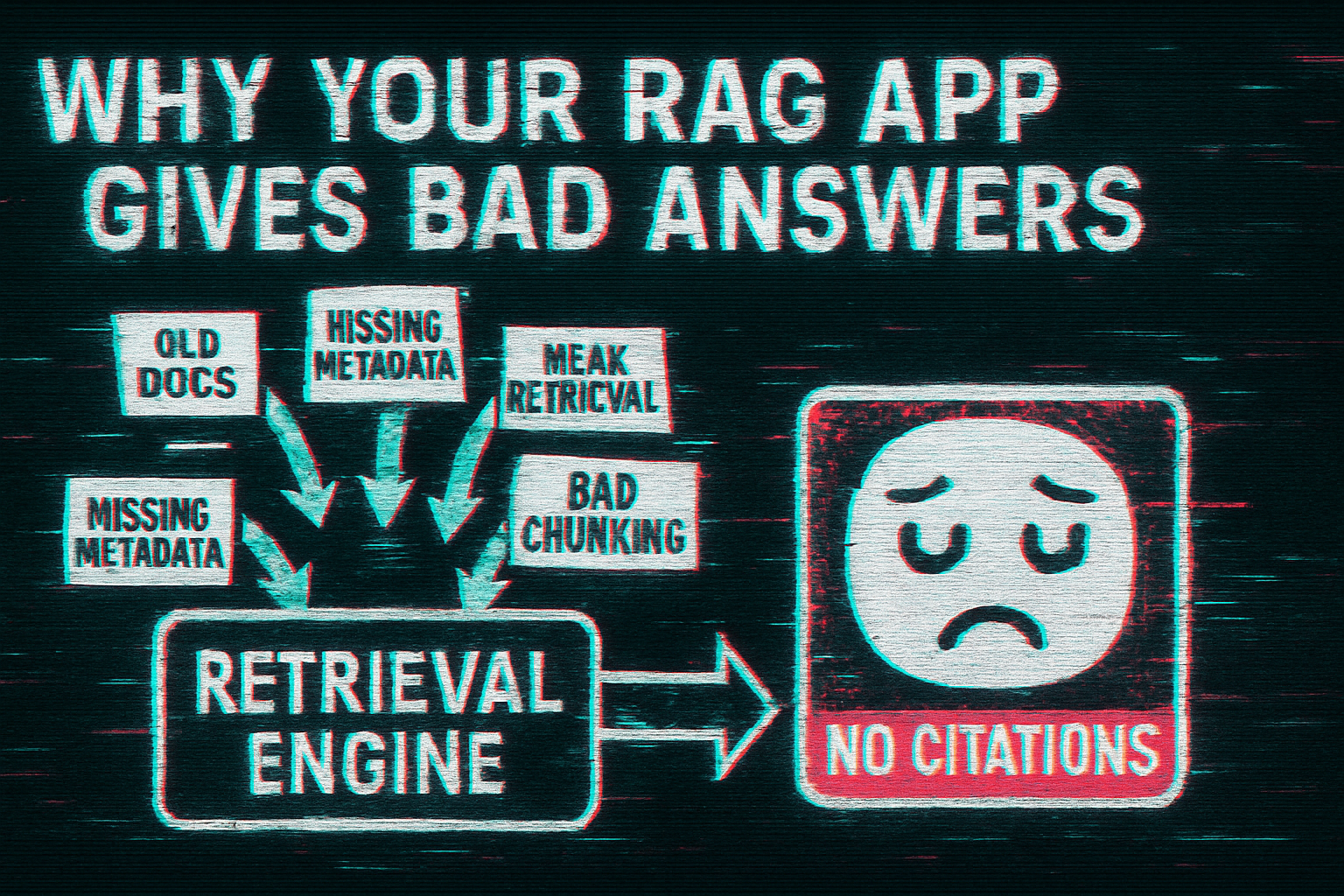
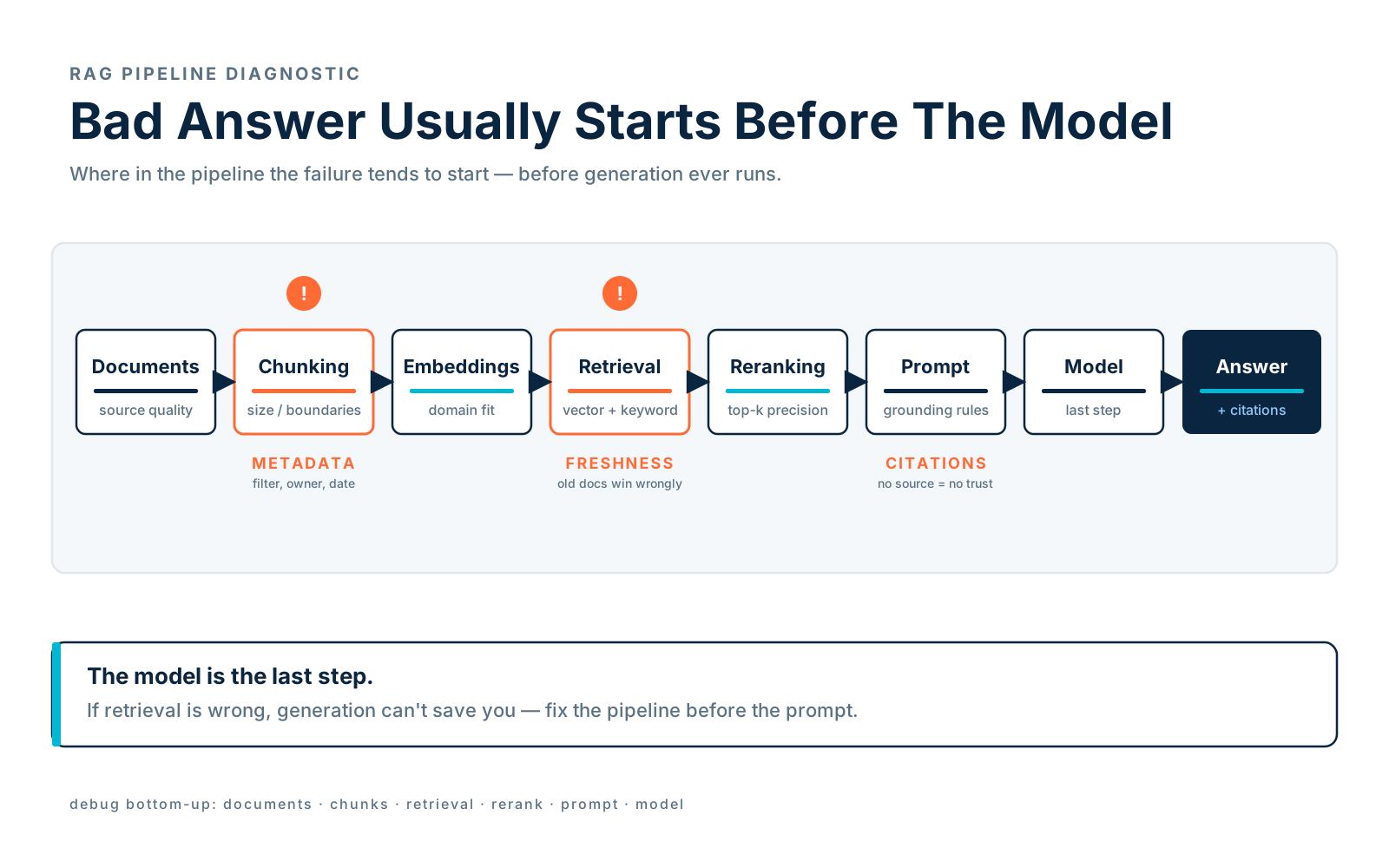
When a RAG app gives a bad answer, people blame the model. Sometimes the model really is the problem — but very often, the model is just the last step in a broken pipeline. RAG quality depends on a long chain of decisions before generation: document quality, chunking, metadata, embeddings, retrieval, filtering, reranking, prompt construction, citations, permissions, freshness, and evaluation. If any link in that chain is weak, generation can't save you.
If retrieval gives the model irrelevant context, the model produces a confident but wrong answer. If the source documents are outdated, the model answers with outdated information. If chunks are too small, the model misses important context; if chunks are too large, retrieval becomes noisy. And if there are no citations, nobody can verify the answer anyway. A bad RAG answer is almost always a symptom — and this article is about debugging the system behind it.
Start By Asking: Was The Right Context Retrieved?
Before changing prompts, inspect retrieval. Take a real question and look at what the system actually pulled in.
How do we cancel subscriptions immediately?Bad retrieved context looks like this:
- Marketing page about subscription pricing
- Old 2021 billing migration
- Incident about invoice emails
- Generic cancellation policy from support docs
The model can't answer correctly with that — none of it touches the actual cancellation code path. Good retrieved context, by contrast, lands on the things a senior engineer would open first:
- app/Services/SubscriptionService.php
- docs/billing/subscription-cancellation.md
- app/Http/Controllers/SubscriptionController.php
- runbooks/billing-cancellation.md
The first debugging question is always the same: did retrieval find the right sources? If it didn't, don't tune the model. Fix retrieval.
Poor Chunking
Chunking is one of the most common RAG problems, and it shows up in the same handful of ways: splitting code in the middle of a method, splitting docs without their headings, creating chunks so small they lose meaning, creating chunks so large they cover unrelated topics, or losing file path / title / section context entirely. Each of those produces a chunk that technically matches the query but doesn't help the model.
Here's an example of a bad chunk — code with no surrounding context:
if ($immediately) {
    $this->billingGateway->cancelNow($subscription->gateway_id);
}
This chunk doesn't say what class it belongs to, what method it's in, or what happens after cancellation. The model has to guess.
A better chunk preserves the structural context — file path, symbol name, full method body:
File: app/Services/SubscriptionService.php
Symbol: SubscriptionService::cancel

final class SubscriptionService
{
    public function cancel(Subscription $subscription, bool $immediately): void
    {
        if ($immediately) {
            $this->billingGateway->cancelNow($subscription->gateway_id);
            $subscription->markCanceledNow();
        } else {
            $subscription->markCancelAtPeriodEnd();
        }

        event(new SubscriptionCanceled($subscription));
    }
}
Now the model has context — class name, signature, the both-branch behavior, and the event that fires after.
When you suspect chunking is the problem, you can debug it directly with the model. A useful prompt:
Inspect these retrieved chunks.

Tell me:
- whether each chunk is self-contained,
- what context is missing,
- whether chunk boundaries are bad,
- how you would chunk this source better.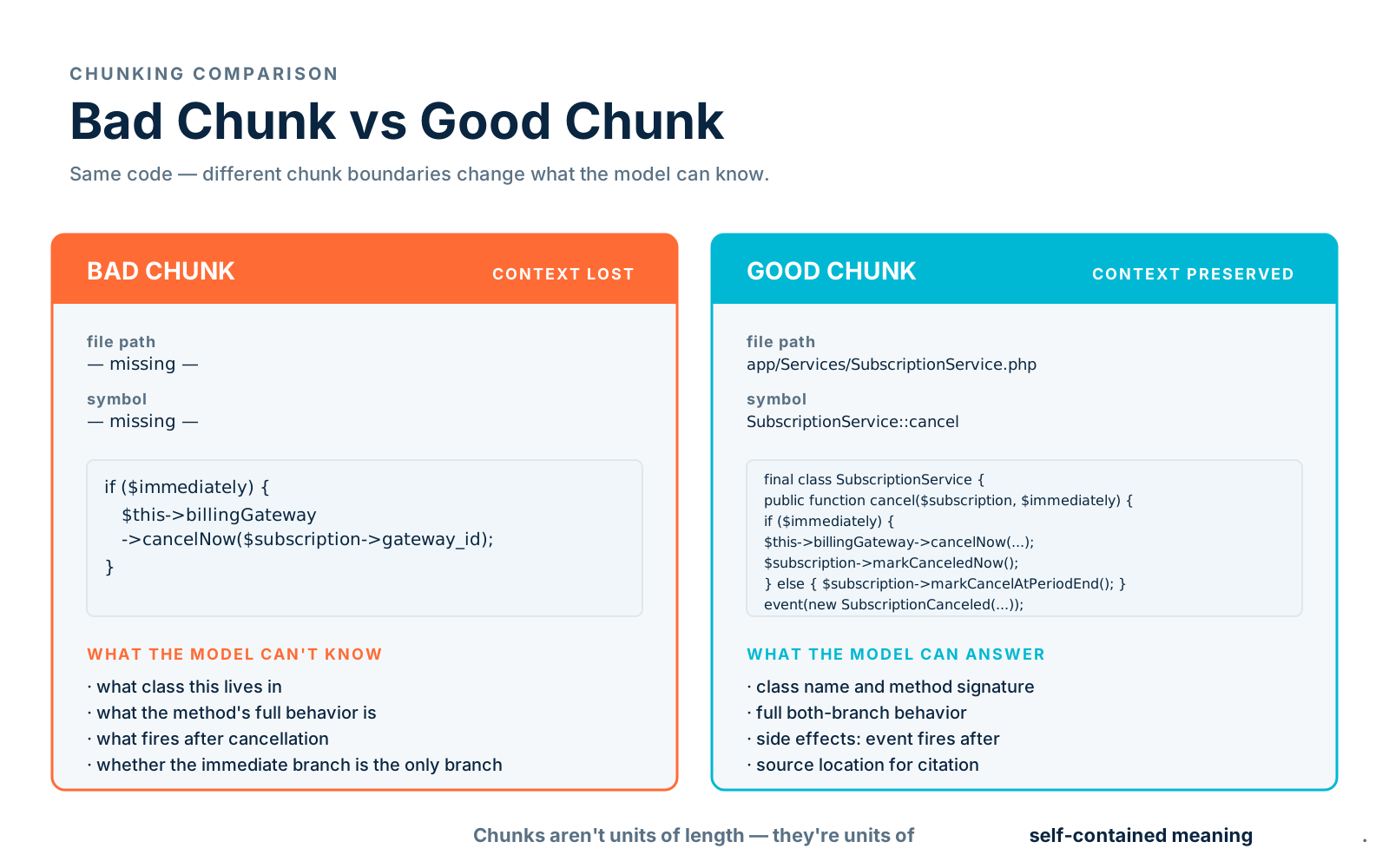
Weak Retrieval
Sometimes the chunks are good, but retrieval is weak. Common causes: pure vector search misses exact names, pure keyword search misses semantic matches, no reranking, vague query, wrong filters, missing metadata, low-quality embeddings for the domain, or simply too few results retrieved.
Take a question like this:
What does ProcessPaymentWebhookJob do?Pure vector search may return general payment docs that "feel" related. But exact keyword search should land directly on:
app/Jobs/ProcessPaymentWebhookJob.phpThat's why engineering RAG usually needs hybrid search — keyword search for exact symbols, vector search for meaning, metadata filters for service / source / access, and reranking for final precision. Each layer covers what the others miss.
When retrieval feels off, debug it the same way you debug retrieval anywhere — give the model the inputs and ask it to explain the failure:
Given this user question and retrieved results, explain why retrieval may have failed.

Question:
[paste]

Retrieved results:
[paste]

Expected source:
[paste if known]

Suggest:
- query rewriting,
- metadata filters,
- hybrid search changes,
- reranking strategy,
- chunking improvements.
Missing Metadata
Without metadata, your RAG system is half-blind. Compare a bare chunk record to one with structure:
{
  "text": "The retry job runs every 15 minutes..."
}
Versus:
{
  "text": "The retry job runs every 15 minutes...",
  "metadata": {
    "source_type": "runbook",
    "service": "payments",
    "path": "runbooks/payment-retries.md",
    "owner": "billing-platform",
    "updated_at": "2026-04-10",
    "access_level": "engineering",
    "environment": "production"
  }
}
Metadata is what lets retrieval do filtering, permissions, citations, freshness checks, ranking, and debugging — all the things that make RAG production-grade instead of demo-grade. With it, you can write a real filter:
results = search(
    query="failed payment webhook retry",
    filters={
        "service": "payments",
        "source_type": ["runbook", "incident", "code"],
        "access_level": "engineering",
    },
)
Without it, you can't. So when your RAG app gives bad answers, check whether metadata is missing or unused before reaching for fancier retrieval.
Outdated Documents
A RAG system with stale documents can be worse than no RAG system at all — at least with no RAG, the model says "I don't know." With stale RAG, the model says something specific and wrong, with a confident citation behind it. Picture this conflict:
Old doc:
Payment retries happen every 5 minutes.

Current code:
Payment retries happen every 30 minutes.
If the old doc is retrieved, the model answers incorrectly with full confidence. The fixes are unglamorous but essential: include updated_at metadata, prefer newer docs in ranking, mark deprecated docs explicitly, remove dead documents from the index, surface freshness in citations, and compare docs against code where possible.
When you suspect freshness conflicts, ask the model directly:
Review these retrieved sources for freshness conflicts.

For each source, identify:
- updated date,
- whether it appears deprecated,
- whether it conflicts with newer sources,
- which source should be trusted more and why.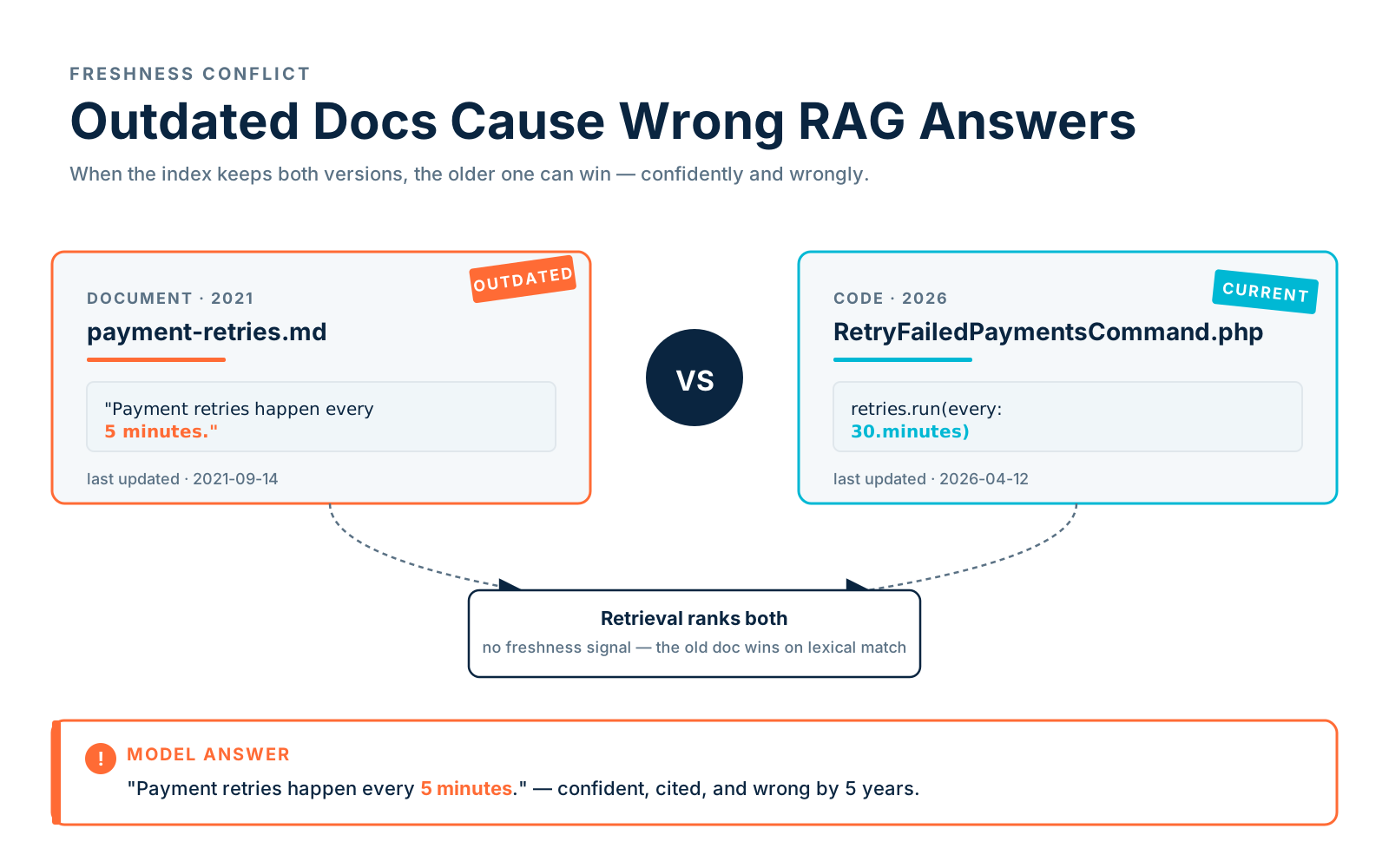
No Citations
A RAG app without citations is hard to trust. Compare these three answers to the same question:
The payment retry job runs every 30 minutes.That's a bad answer — no source, no way to check. A better one names the source:
The payment retry job runs every 30 minutes according to
`app/Console/Commands/RetryFailedPaymentsCommand.php` and
`runbooks/payment-retries.md`.
And the best one names sources, dates them, and surfaces a known conflict:
The payment retry job runs every 30 minutes. The current source is
`app/Console/Commands/RetryFailedPaymentsCommand.php`, updated 2026-04-12.
The older runbook from 2024 says 15 minutes, so it may be outdated.
Citations are not decoration — they're debugging tools. They let users verify the answer and report bad sources back into the system. The simplest way to enforce this is in the prompt itself:
Cite the source for every factual claim.
If sources conflict, explain the conflict.
If no source supports the answer, say so.
Irrelevant Context Causes Hallucinations
RAG can make hallucinations worse if it adds irrelevant context. The model dutifully tries to use what you gave it, and if what you gave it is unrelated, the model invents a connection. Take this question:
How do we validate payment webhook signatures?Bad context — superficially related, mechanically irrelevant:
- password reset token validation
- generic API authentication docs
- payment retry job
- email webhook settings
The model may stitch these into a plausible-but-wrong answer about webhook signatures. This is why "more context" is not always better. Better retrieval narrows in:
- PaymentWebhookController.php
- docs/payments/webhook-signatures.md
- runbooks/payment-webhook-failures.md
Quality beats quantity — a tight, correct context window outperforms a stuffed one almost every time.
No Evaluation Set
If you don't have an evaluation set, you're debugging by vibes. The fix doesn't require a research budget — just a small, durable set of known questions paired with the sources that should be retrieved:
[
  {
    "question": "How do we validate payment webhook signatures?",
    "expected_sources": [
      "app/Http/Controllers/PaymentWebhookController.php",
      "docs/payments/webhook-signatures.md"
    ]
  },
  {
    "question": "What happens when subscription cancellation is immediate?",
    "expected_sources": [
      "app/Services/SubscriptionService.php",
      "docs/billing/subscription-cancellation.md"
    ]
  }
]
Then measure the things that actually matter: did retrieval find the expected sources? Did reranking put them near the top? Did the answer cite them? Did the answer avoid unsupported claims?
Did retrieval find expected sources?
Did reranking put them near the top?
Did the answer cite them?
Did the answer avoid unsupported claims?
Crucially — evaluate retrieval separately from generation. If retrieval fails, no amount of prompt engineering will save you.
A Practical RAG Debugging Checklist
When an answer is bad, walk the system top to bottom and inspect each layer:
Question:
What did the user ask?

Retrieved chunks:
Were they relevant?

Expected sources:
Which sources should have been retrieved?

Chunk quality:
Are chunks self-contained?

Metadata:
Can you filter by source, service, date, access?

Freshness:
Are documents current?

Reranking:
Were the best chunks promoted?

Prompt:
Did it force source-grounded answers?

Citations:
Can the user verify the answer?

Evaluation:
Is this failure part of a known test case?
Run through that list and the system tells you where it broke.
Example: Debugging A Bad Answer
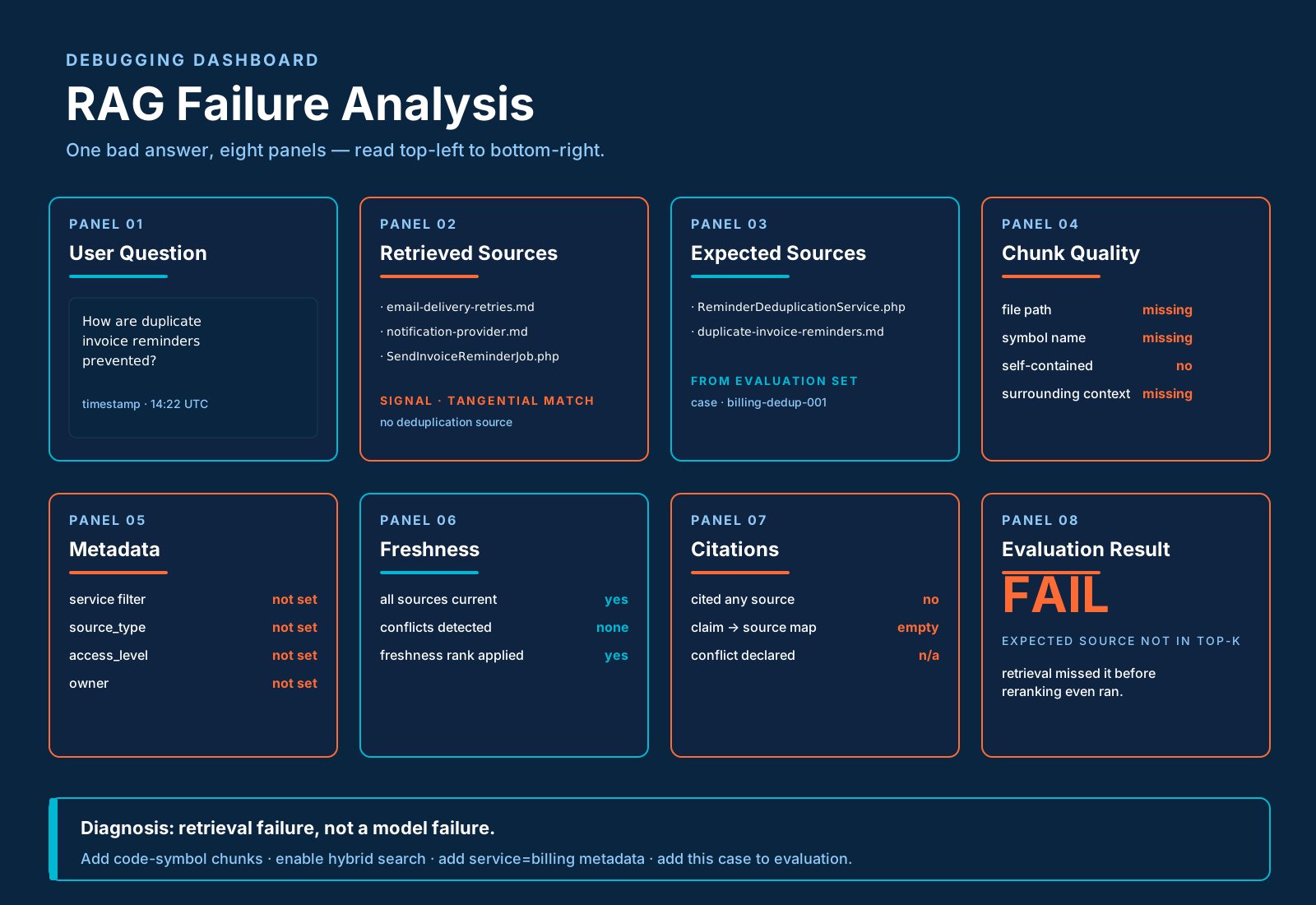
To see the checklist in action, take a real-shaped failure. The user asks:
How are duplicate invoice reminders prevented?The system answers:
The system uses exponential backoff to prevent duplicate reminders.That's wrong — exponential backoff is about timing retries, not deduplicating them. Looking at what was retrieved:
- docs/email-delivery-retries.md
- runbooks/notification-provider.md
- app/Jobs/SendInvoiceReminderJob.php
And what should have been retrieved:
app/Services/ReminderDeduplicationService.php
incidents/duplicate-invoice-reminders.md
The diagnosis writes itself:
The retrieval system matched "duplicate reminders" with generic email retry docs.
It missed the exact deduplication service.
Hybrid search should boost "invoice reminder" and "deduplication".
Metadata filter should prioritize billing service sources.
And the fixes follow directly — add code symbol chunks, add service=billing metadata, switch to hybrid search, add reranking, add an evaluation case for duplicate invoice reminders. That's real RAG debugging: question, retrieval, expected, gap, fix.
Common Fixes
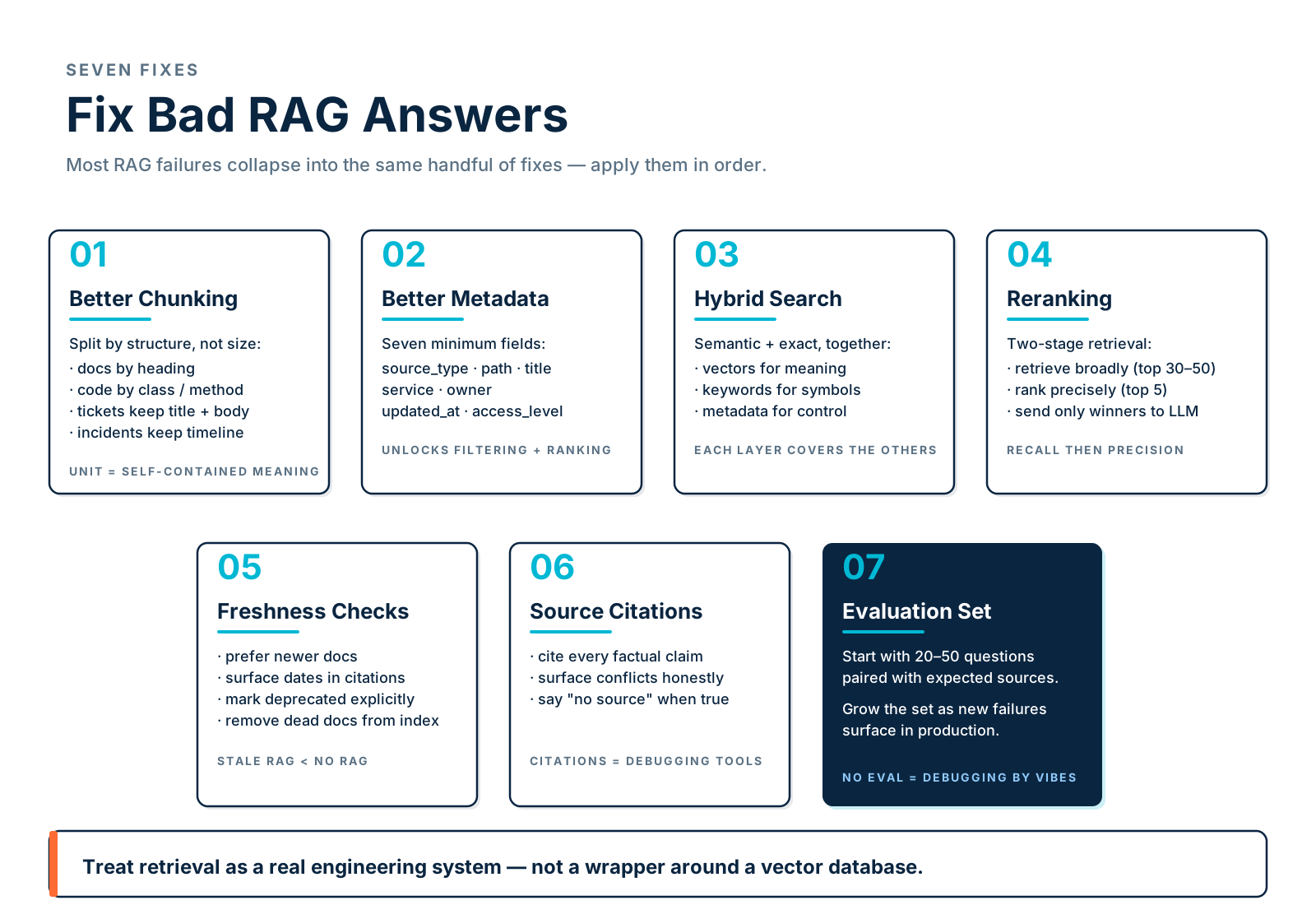
Most of the failure modes above collapse into the same handful of fixes.
Improve Chunking
Chunk by structure, not arbitrary size. Docs split on heading sections, code splits on class / method / function boundaries, tickets keep title plus body plus resolution together, incidents keep summary plus timeline plus root cause plus action items.
Add Metadata
At minimum: source_type, path, title, service, owner, updated_at, access_level. These are the seven that unlock filtering, permissions, ranking, and debugging.
Use Hybrid Search
Combine semantic and exact matching. Vector search alone misses symbol names; keyword search alone misses meaning.
Add Reranking
Rerank the top 30–50 candidates from first-stage retrieval before prompt construction. The two-stage "retrieve broadly, rank precisely" pattern is what most production RAG systems converge on.
Require Citations
No citations, no trust. Bake them into the prompt and check for them in evaluation.
Build Evaluation
Start with 20–50 important questions paired with expected sources. Grow the set over time as new failures surface.
Add Feedback
Let users mark answers as helpful, wrong, outdated, missing-source, or permission-issue. Crucially, route that feedback back into the retrieval system — not only the prompt. If users keep flagging "outdated," the freshness layer is broken; if they keep flagging "missing source," the chunk graph is incomplete.
Final Thoughts
Bad RAG answers usually come from bad retrieval, bad chunks, missing metadata, outdated sources, or no evaluation. The model is only one part of the system, and tuning it last is the right instinct. Before changing the prompt, inspect the pipeline:
Did we retrieve the right thing?
Was it current?
Was it allowed?
Was it cited?
Was it enough?
A good RAG app is not built by throwing documents into a vector database. It's built by treating retrieval as a real engineering system — chunk carefully, add metadata, use hybrid search, rerank, cite sources, evaluate constantly. That's how your RAG app starts giving answers developers can actually trust.