
The official React docs published a page in 2023 titled "You Might Not Need an Effect". It's one of the most quietly important pieces of writing the React team has put out. If you take 30 minutes to read it carefully and apply it to your codebase, you'll usually delete more lines of code than you write for the rest of the week.
This article is the friendly version. We'll walk through six of the patterns that show up in nearly every codebase, what they look like, and what to do instead. The goal is not to ban useEffect — it's to stop using it for things that aren't effects.
Pattern 1: Updating State Based On Props Or Other State
You see it constantly:
function Cart({ items }) {
  const [total, setTotal] = useState(0);

  useEffect(() => {
    setTotal(items.reduce((sum, i) => sum + i.price * i.qty, 0));
  }, [items]);

  return <div>Total: ${total}</div>;
}
total is fully determined by items. It's not state — it's a function of state. Storing it as state means an extra render every time items changes (one with stale total, one with fresh total), and the brief moment between them where the UI is wrong.
function Cart({ items }) {
  const total = items.reduce((sum, i) => sum + i.price * i.qty, 0);
  return <div>Total: ${total}</div>;
}
Done. If items is huge and the reduce is genuinely expensive, wrap it in useMemo:
const total = useMemo(
  () => items.reduce((sum, i) => sum + i.price * i.qty, 0),
  [items]
);
Don't reach for useMemo reflexively. For trivial computations, it's slower than just doing the math.
Pattern 2: Resetting State When A Prop Changes
function ProfileEditor({ userId }) {
  const [draft, setDraft] = useState('');

  useEffect(() => {
    setDraft('');
  }, [userId]);

  return <textarea value={draft} onChange={e => setDraft(e.target.value)} />;
}
This works, but it has the same two-render problem — and worse, the draft from the previous user is briefly visible on the next user's profile while React catches up.
The React-official fix is the key prop:
function ProfilePage({ userId }) {
  return <ProfileEditor key={userId} userId={userId} />;
}
A different key tells React "this is a different instance — throw away the old state and remount". It's an instant reset, no flicker, no effect needed. This trick is one of the most underused features in React.
Pattern 3: Doing Something When The User Clicks
function BuyButton({ productId }) {
  const [bought, setBought] = useState(false);

  useEffect(() => {
    if (bought) {
      sendAnalytics('purchase', productId);
      navigate('/thanks');
    }
  }, [bought]);

  return <button onClick={() => setBought(true)}>Buy</button>;
}
The button click already gave you the event. You don't need state to remember it just so an effect can react to it. Just put the work in the handler:
function BuyButton({ productId }) {
  const handleClick = () => {
    sendAnalytics('purchase', productId);
    navigate('/thanks');
  };
  return <button onClick={handleClick}>Buy</button>;
}
Whenever you see a useEffect whose body starts with if (something), ask if something was set in response to a user action. If yes, the work belongs in that handler.
Pattern 4: Initialising State From Props
function Editor({ initialValue }) {
  const [value, setValue] = useState('');

  useEffect(() => {
    setValue(initialValue);
  }, []); // deliberately empty

  return <input value={value} onChange={e => setValue(e.target.value)} />;
}
Two problems. First, you render once with '' and then re-render with initialValue — visible flicker. Second, the lint rule will yell at you for the empty dependency array, and you'll feel guilty about it.
Just use the initial-value form of useState:
function Editor({ initialValue }) {
  const [value, setValue] = useState(initialValue);
  return <input value={value} onChange={e => setValue(e.target.value)} />;
}
The argument to useState is only read on the first render. After that, it's ignored. If initialValue is genuinely expensive to compute, pass a function:
const [value, setValue] = useState(() => parseExpensive(initialValue));The function form runs once, on mount only.
Pattern 5: Transforming Data Before Submitting
const [name, setName] = useState('');
const [trimmed, setTrimmed] = useState('');

useEffect(() => {
  setTrimmed(name.trim().toLowerCase());
}, [name]);

const onSubmit = () => save(trimmed);
There's no reason to keep trimmed around at all. The transform only matters at the moment of submit:
const [name, setName] = useState('');
const onSubmit = () => save(name.trim().toLowerCase());
State exists to be displayed across renders. If a value is only needed in one specific moment (a click, a save), compute it in that moment. Effects are not for one-off calculations.
Pattern 6: Reading From An External Store
This one is the opposite — a place where developers often skip useEffect and shouldn't, but where there's a better hook entirely. If you need to read from localStorage, the URL, the network status, or any other external value that can change, the right primitive is useSyncExternalStore:
function useOnlineStatus() {
  return useSyncExternalStore(
    (callback) => {
      window.addEventListener('online', callback);
      window.addEventListener('offline', callback);
      return () => {
        window.removeEventListener('online', callback);
        window.removeEventListener('offline', callback);
      };
    },
    () => navigator.onLine,           // client snapshot
    () => true                         // server snapshot
  );
}
Compared to a useEffect + useState pair, this hook is concurrent-safe (no tearing under React 18 transitions), supports SSR (the third argument), and integrates with Suspense. It's verbose, so libraries tend to wrap it — TanStack Query, Zustand, Redux all use it under the hood.
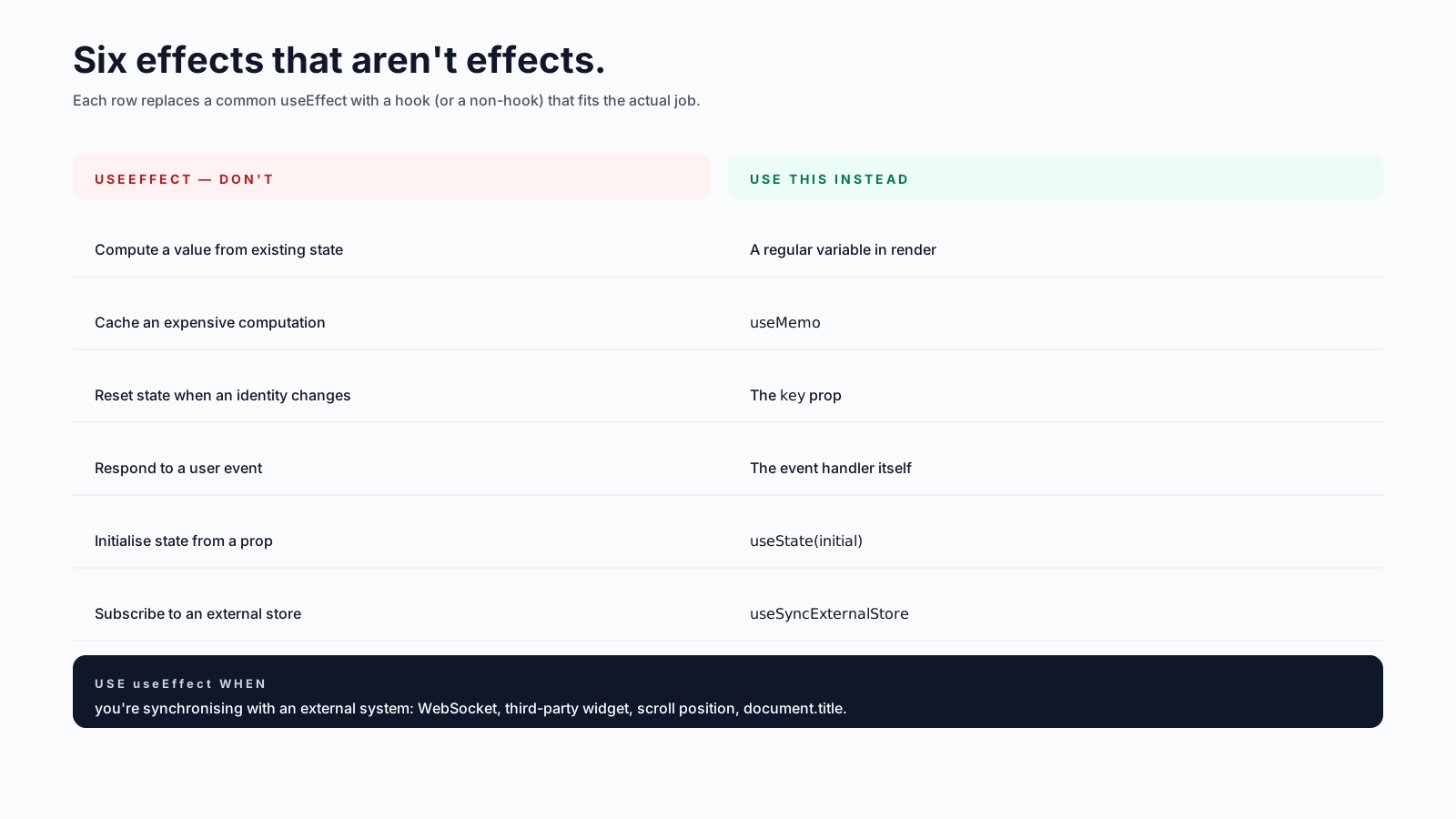
A Mental Replacement Table
When you find yourself reaching for useEffect, run through this table first:
| Trying to do | Use this instead |
|---|---|
| Compute a value from existing state | a regular variable in render |
| Cache an expensive computation | useMemo |
| Reset state when an identity changes | the key prop |
| Respond to a user event | the event handler |
| Initialise state from props | useState(initial) |
| Subscribe to an external store | useSyncExternalStore |
| Sync with a third-party widget | useEffect ✅ (genuine effect) |
| Send analytics after a click | the click handler |
| Fetch data tied to a route or input | TanStack Query / SWR |
The last three rows are when useEffect is actually doing what it was designed for: reaching out to the world outside React. Everything else has a better tool.
What This Looks Like At Scale
In a recent codebase audit, I removed about 40% of the useEffect calls in a medium-sized React app. The team was nervous at first — it's a lot of code to delete. The result was fewer renders per interaction, no more "wait, why did this fetch twice?" tickets, and a noticeable speed-up on slower devices.
Nothing in this article is clever. The trick is just asking, every time you type useEffect, whether the thing you're about to write is synchronising with an external system. If it isn't, there's almost certainly a tool that fits better — and the answer is usually shorter than the effect would have been.






